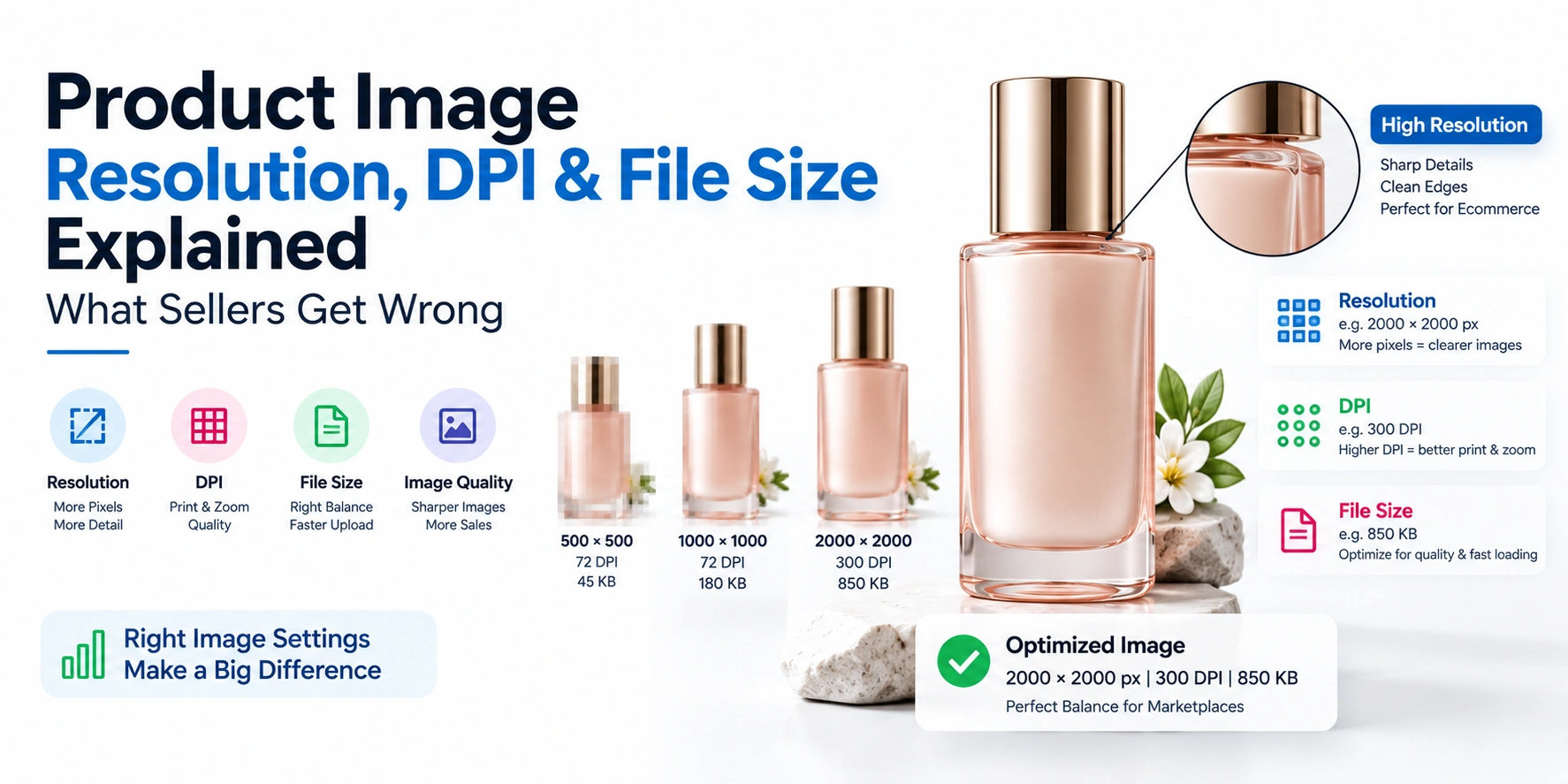




Amazon infographic images are the secondary listing images (positions 2–9) that use text, icons, and graphics to communicate product features, dimensions, and size charts — something not allowed on the main image. Amazon permits up to 9 total images per listing (1 main + 8 additional), each recommended at 1600×1600px minimum (2000×2000px best practice) for zoom functionality, in JPEG format under 10MB. Text and graphics are fully allowed on infographic slots, but the main image must remain a clean, pure white background with no overlays. Getting the size, format, and content rules wrong is one of the most common reasons Amazon listings get rejected or suppressed.
If you're building infographic images for your Amazon listings, here's everything you need to get it right the first time.
Quick Reference: Amazon Infographic Image Specs at a Glance
| Requirement | Specification |
|---|---|
| Total images allowed | Up to 9 per listing (1 main image + 8 additional/infographic slots) |
| Minimum size for zoom | 1000×1000px (1600×1600px recommended) |
| Best practice resolution | 2000×2000px to 3000px on the longest side |
| Maximum file size | 10 MB |
| Accepted formats | JPEG (preferred), TIFF, PNG, non-animated GIF |
| Color mode | sRGB or CMYK |
| Text/graphics allowed | Yes, on infographic (secondary) images — not on the main image |
| Main image background | Pure white only (RGB 255, 255, 255) |
| File naming | ASIN.variant.extension (e.g., B012345678.PT01.jpg) |
What Are Amazon Infographic Images, and Why Do They Matter
Amazon infographic images are the secondary product images — positions 2 through 9 in your listing — that use text callouts, icons, comparison charts, and size guides to explain your product's features at a glance. Unlike your main image, which must stay clean and product-only, infographic slots are where you're allowed to add text, arrows, and graphic overlays to answer buyer questions before they even read your description.
These images matter because most shoppers scroll through your image gallery before reading a single line of your listing copy. A well-designed set of infographic images — highlighting key features, dimensions, and use cases — can meaningfully affect conversion, since it answers common questions (size, material, what's included) visually, right where the buyer is already looking.
Amazon Infographic Image Size and Dimensions
Amazon's technical requirements for infographic images follow the same base specs as your other listing images:
- Minimum size: 1000×1000 pixels on the longest side (required for the zoom feature to activate)
- Recommended size: 1600×1600 pixels or larger
- Best practice for 2026: 2000–3000 pixels on the longest side, since higher resolution correlates with better zoom quality and buyer engagement
- Maximum dimension: No side should exceed 10,000 pixels
- File size cap: 10 MB per image
One detail worth planning around: mobile preview size. Most shoppers browse Amazon on mobile, where infographic images display much smaller than they appear on desktop. A good practice is to preview your infographic at roughly 300×300 pixels — close to its mobile thumbnail size — and confirm your text is still readable at that size. As a general rule, keep text no smaller than what would translate to about 24px at that preview size, or it risks becoming illegible on a phone screen.
How Many Infographic Images Are Allowed on an Amazon Listing
Amazon Footwear Photography — Professional Shoes Photography for Amazon Listings
Getting your shoes listed and selling on Amazon starts with one non-negotiable requirement: images that pass Amazon's strict compl...
Explore Amazon Footwear Photography — Professional Shoes Photography for Amazon ListingsAmazon allows up to 9 total images per listing — 1 main image plus 8 additional image slots. There's no separate "infographic quota" beyond this; your infographic, lifestyle, and size chart images all share this same pool of 8 additional slots alongside your main product photo.
Given this limit, most sellers plan their 8 additional slots strategically rather than filling them randomly — for example: a lifestyle/in-use shot, 2–3 feature-callout infographics, a size chart or dimension graphic, a detail/close-up shot, a comparison or "what's included" graphic, and a brand story or packaging image.
Amazon Infographic Image Rules: What's Allowed and What's Not
Allowed on infographic (secondary) images:
- Text callouts, arrows, and icons explaining features
- Size charts and dimension graphics
- Comparison charts (e.g., "before vs. after," or comparing product variants)
- Lifestyle context showing the product in use
- Multiple product angles with labeled features
Not allowed, even on infographic images:
- Misleading claims or features the product doesn't actually have
- Excessive or hard-to-read text cluttering the entire frame
- Copyrighted logos, trademarks, or branding you don't own
- Content that violates Amazon's general content policies (offensive material, unverified claims, etc.)
Reserved exclusively for the main image (never for infographics to substitute):
- The main image itself must stay clean — pure white background, no text, no logos, no graphic overlays, product filling roughly 85% of the frame
How to Create Infographic Images for Amazon Listings
- Identify your top 3–5 selling points — the features buyers most need to know before purchasing. Don't try to cram everything into one image.
- Design one clear message per infographic, rather than combining multiple features into a single cluttered graphic.
- Place your strongest benefit in the top-left area of the image, since that's typically where a viewer's eye lands first.
- Use high-contrast, readable fonts — test your design at small mobile-thumbnail size before finalizing.
- Keep a consistent visual style across all your infographic images, so the listing gallery feels cohesive rather than mismatched.
- Export at the recommended resolution (1600–2000px+) and check that the file size stays under 10 MB.
Size Chart Image Guidelines for Amazon Listings
Amazon Product Photography in Delhi
Sanjay Babu Lohar, founder of Lohar Studio Delhi, has been photographing products for Amazon sellers since 2009 — over 15 ye...
Explore Amazon Product Photography in DelhiA size chart image is one of the most valuable infographic slots for apparel, footwear, and any product with size variants, since sizing confusion is a leading cause of returns.
- Use a clear table format — sizes down one axis, measurements (chest, waist, length, etc.) across the other
- Include the measurement units clearly (cm and inches, if you sell to a mixed audience)
- Show how to measure, if relevant — a simple diagram showing where "chest" or "waist" is measured on the body reduces buyer guesswork
- Keep the design simple and high-contrast — a size chart is functional content; it should be scannable in seconds, not overly stylized
- Match your resolution and format to the same specs as your other infographic images (1600px+ recommended, JPEG)
Size Chart Image Mistakes That Hurt Amazon Sales
- Text too small to read on mobile, forcing buyers to zoom in repeatedly or give up entirely
- Only one unit of measurement, alienating buyers who think in the other unit
- No visual reference for how to measure, leaving buyers unsure whether their own measurements match the chart correctly
- Inconsistent sizing information between the size chart image and the written product description — this mismatch is a common source of buyer confusion and returns
- Placing the size chart too far back in the image order, past position 5 or 6, where fewer buyers actually scroll to see it
Amazon A+ Content Infographic Images
For brand-registered sellers, A+ Content offers additional infographic modules below the standard listing images, with their own separate size specifications:
| A+ Module Type | Typical Dimensions |
|---|---|
| Standard image modules | 300×300px, 600×450px, or 970×300/600px, depending on module type |
| Premium full-width module | 1,464×600px (desktop), ~600×450px (mobile) |
| Maximum file size | 2 MB per image (some modules allow up to 3 MB) |
A+ Content infographics work differently from standard listing images — they're placed further down the product page and are used more for brand storytelling and detailed feature breakdowns. Sellers using A+ Content commonly report meaningful conversion improvements, since these modules give buyers additional context beyond what fits in the standard 9-image gallery.
Common Amazon Infographic Image Mistakes
- Overcrowding a single infographic with too many features or too much text, making none of it easy to read
- Ignoring mobile preview size, resulting in text that looks fine on desktop but is illegible on a phone
- Uploading images below the recommended resolution, missing out on the zoom feature and looking lower-quality next to competitor listings
- Inconsistent branding or style across the infographic set, making the gallery feel disjointed
- Placing text or graphics on the main image, which risks listing suppression since this violates Amazon's core main-image policy
Best Practices Checklist Before Uploading
Fashion and Model Photoshoot for Amazon
Lohar Studio provides professional Amazon fashion & model photography specifically for sellers listing on Amazon India. If you...
Explore Fashion and Model Photoshoot for Amazon- Confirm each infographic is at least 1600×1600px (ideally 2000px+)
- Preview every image at mobile thumbnail size to check text legibility
- Keep your main image completely clean — no text, logos, or graphics
- Include a clear size chart if your product has size variants
- Use consistent fonts, colors, and layout style across your image set
- Stay within the 8 additional image slots, prioritizing your most important content first
- Save files under 10 MB in JPEG format with sRGB color mode
FAQs
1. How many infographic images are allowed on an Amazon listing?
Amazon allows up to 9 total images per listing — 1 main image plus 8 additional slots, which can include infographics, lifestyle shots, and size charts.
2. What is the recommended size for Amazon infographic images?
1600×1600 pixels minimum, with 2000–3000 pixels on the longest side recommended for the best zoom quality and image sharpness.
3. Can I add text to my Amazon infographic images?
Yes — text, icons, and graphics are allowed on infographic (secondary) images, but not on the main product image, which must remain clean and product-only.
4. What file format should Amazon infographic images be?
JPEG is preferred, though TIFF, PNG, and non-animated GIF are also accepted, with a maximum file size of 10 MB per image.
5. How do I create a size chart image for my Amazon listing?
Use a clear table format with sizes and measurements, include both cm and inches if relevant, and add a simple diagram showing how to measure, keeping the design high-contrast and easy to scan.
Jewellery Photography for Amazon
At Lohar Studio, we specialize in jewellery photography for Amazon, helping sellers showcase gold, diamond, silver, and fashion je...
Explore Jewellery Photography for Amazon6. Why do size chart image mistakes hurt Amazon sales?
Illegible text, missing measurement units, or inconsistency with the written description all increase buyer uncertainty, which typically leads to more returns and lower conversion.
7. What's the difference between standard infographic images and Amazon A+ Content?
Standard infographics appear in your main 9-image gallery, while A+ Content (available to brand-registered sellers) adds separate, differently-sized modules further down the product page for deeper brand storytelling.
8. Can infographic images help my Amazon listing rank better?
Indirectly, yes — better images improve click-through and conversion rate, both of which are factors in Amazon's ranking algorithm, even though infographics aren't a direct ranking signal themselves.
9. What size should text be on an Amazon infographic to stay readable on mobile?
Preview your image at roughly 300×300 pixels (mobile thumbnail size) and keep text no smaller than what would appear as about 24px at that size.
10. What's the most common reason Amazon rejects infographic images?
Common rejection reasons include text or graphics mistakenly placed on the main image, misleading claims, or content that violates Amazon's general image content policies.
Need Amazon-compliant infographic and size chart images for your listings?
[Get in touch with Lohar Studio] with your product details and ASIN count — we'll build a complete, marketplace-compliant image set including infographics and size charts that meet Amazon's current specs.
If you're looking to enhance your brand’s presence on leading e-commerce platforms like Amazon, Flipkart, Myntra, Meesho, TataCliQ, Snapdeal, and Ajio, Lohar Studio is your go-to destination. Our team specializes in delivering high-quality images for fashion items, footwear, automotive products, medical photography, business headshots, and corporate shoots. We serve Delhi, Noida, Gurgaon, Faridabad, and Ghaziabad, offering professional results that boost conversions and elevate your brand’s image. Get in touch today at +91 9312070458 or visit us at A1/58, 1st Floor, Sector 6 Rd, Pocket 1, Sector 6A, Rohini, Delhi, 110085, to schedule your next shoot!

Written from hands-on experience shooting for 4000+ brands - practical, field-tested photography advice, not just theory.