


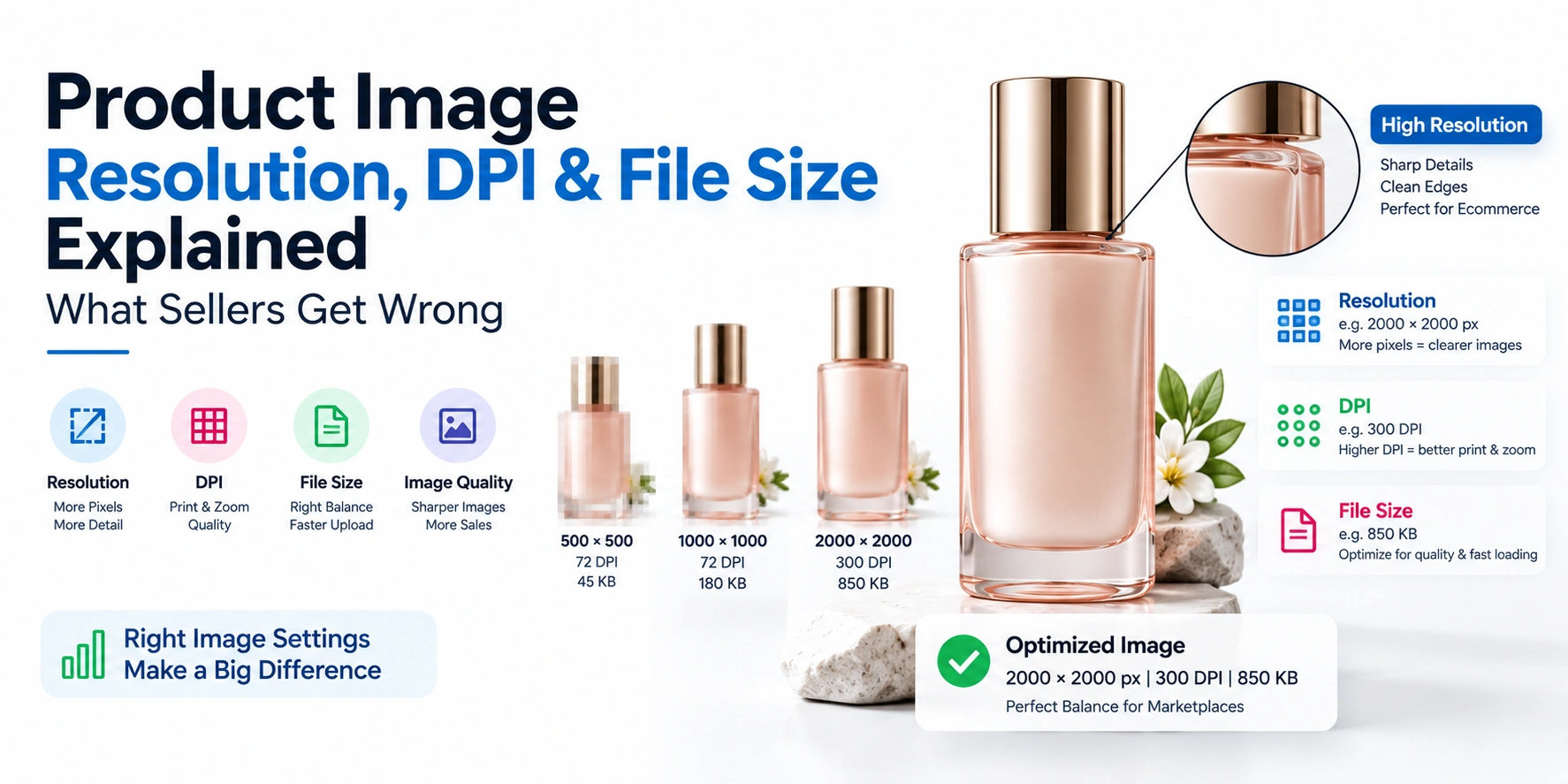
The most common product image quality problems sellers run into aren't about the shoot itself — they're about resolution, DPI, and file size decisions made after the shoot. DPI is essentially irrelevant for online listings, since browsers and marketplaces only read pixel dimensions, not the DPI value embedded in a file. Most quality problems come from three specific mistakes: uploading images below marketplace minimums, artificially upscaling small images instead of reshooting, and exporting oversized files that slow page load without adding visible quality. Understanding these three factors correctly is what separates a crisp, professional listing from one that looks blurry, inconsistent, or slow to load.
If your product images look "off" despite a decent shoot, here's what's actually going wrong — and how to fix it.
The Most Common Product Image Quality Problems Sellers Run Into
Before getting into the technical details, it helps to see the pattern. Across most ecommerce catalogs, the same handful of image quality problems show up repeatedly:
- Uploading images below marketplace minimums — often under 1000px on the longest side — resulting in blurry zoom or no zoom functionality at all
- Artificially upscaling small or low-quality images to hit a resolution requirement, which creates soft, pixelated results rather than genuine detail
- Confusing DPI with actual image quality, assuming a higher DPI number in editing software will make a web image look sharper — it won't
- Uploading oversized, uncompressed files that slow page load speed without adding any visible improvement on screen
- Inconsistent dimensions and aspect ratios across a catalog, making some listings look sharp and others look noticeably weaker in the same category grid
Each of these stems from a misunderstanding of what resolution, DPI, and file size actually control — which is worth breaking down properly.
What Resolution Actually Means for Your Listings
Resolution, in the context of online product images, refers to pixel dimensions — the actual width and height of the image measured in pixels, such as 2000×2000px. This is the number that determines two things that directly affect your listing: how sharp the image looks on screen, and whether zoom functionality works properly on platforms that support it.
Most major marketplaces require a minimum resolution to enable zoom — Amazon's baseline is 1000px on the longest side, though 2000–3000px is recommended for a genuinely crisp, zoomable image. Falling short of a platform's minimum doesn't just look mediocre — it can disable zoom entirely, putting your listing at a visible disadvantage next to competitors whose images zoom properly.
The DPI Myth: Why It Doesn't Matter for Online Images
Fashion and Model Photoshoot for Amazon
Lohar Studio provides professional Amazon fashion & model photography specifically for sellers listing on Amazon India. If you...
Explore Fashion and Model Photoshoot for AmazonThis is the single most misunderstood part of image quality for ecommerce sellers. DPI (dots per inch) is a print measurement — it tells a printer how many dots of ink to place per inch of physical paper. It has nothing to do with how an image displays on a screen.
Browsers, marketplaces, and mobile apps only read pixel dimensions, not the DPI value embedded in a file's metadata. An image saved at 72 DPI and the exact same image resaved at 300 DPI — with identical pixel dimensions — will look completely identical on screen. Many sellers assume bumping the DPI setting in Photoshop or Lightroom will make an image sharper online; it changes nothing about how the image actually appears on a screen.
The only time DPI genuinely matters is for print — packaging, catalogs, or physical marketing material — where it determines print sharpness at a specific physical size. For every online listing, pixel dimensions are the number that actually matters.
File Size vs. Quality: Getting the Balance Right
File size — the actual weight of the image file in KB or MB — is a separate consideration from resolution, and getting the balance wrong creates its own quality problems:
- Oversized files (several MB per image, straight from a high-megapixel camera) slow down page load speed, which hurts both user experience and search ranking, without providing any visible quality benefit on screen
- Overcompressed files save space but introduce visible artifacts — blurriness, blocky patterns, or color banding — that make the image look noticeably lower quality
- The practical sweet spot for most ecommerce images is exporting as JPEG at roughly 85–90% quality, which balances sharp visual detail with a reasonably fast-loading file size
Most marketplaces also set a maximum file size limit (commonly around 10MB), so an oversized file may not even upload successfully, forcing a rushed, uncontrolled compression at the last minute instead of a deliberate export setting.
Resolution Requirements by Marketplace
| Platform | Minimum Resolution | Recommended Resolution | Notes |
|---|---|---|---|
| Amazon | 1000px (longest side) | 2000–3000px | Needed to enable zoom functionality |
| Flipkart | 500×500px | 1500×2000px | Higher resolution avoids looking low-quality next to competitors |
| Myntra | 1080×1440px | 1500×2000px | Strict 3:4 portrait aspect ratio required |
| Shopify | Not enforced | 2048×2048px | Recommended for sharp display across themes and retina screens |
| Etsy | Not strictly enforced | 2700×2025px | 4:3 aspect ratio recommended |
| eBay | 500px minimum | 1600px | Higher resolution improves zoom and buyer confidence |
Fashion and Model Photography for Myntra
Lohar Studio provides professional Myntra fashion & model photography for apparel brands, private labels, and sellers listing...
Explore Fashion and Model Photography for MyntraSince requirements differ across platforms, shooting at a high base resolution and exporting down for each platform is far more reliable than trying to shoot separately at each platform's minimum.
Why Upscaling Never Actually Fixes a Low-Resolution Image
When an image falls short of a marketplace's resolution requirement, the instinct is often to upscale it using editing software to hit the minimum. This doesn't work the way sellers expect: upscaling software can only estimate new pixels based on existing data — it can't recover detail that was never captured in the first place. The result is typically a softer, sometimes visibly pixelated image that fails to hold up under a marketplace's zoom feature, even though it technically now meets the pixel dimension requirement.
If an existing image genuinely doesn't meet a platform's resolution needs, reshooting at the correct resolution from the start almost always produces a better result than attempting to upscale an undersized file after the fact.
How to Avoid Common Product Image Quality Problems Going Forward
- Shoot at your camera's highest usable resolution — most modern cameras and phones easily exceed every major marketplace's requirement, giving you room to export down rather than needing to upscale later
- Ignore DPI settings entirely for web images — focus only on pixel dimensions when checking a platform's requirements
- Export as JPEG at 85–90% quality for most listings, reserving PNG specifically for images that need a transparent background
- Keep dimensions and aspect ratios consistent across your entire catalog, even when exporting different sizes for different platforms
- Check the actual exported file, not just the working file, before uploading — export settings can quietly introduce quality or sizing issues even when the original edit was correct
FAQs
1. What are the most common product image quality problems sellers face?
The most frequent issues are uploading images below marketplace resolution minimums, artificially upscaling small images, confusing DPI with actual quality, and exporting oversized files that slow page load without improving visible quality.
2. Does DPI matter for online product images?
Fashion and Model Photography for Meesho
Sanjay Babu Lohar, founder of Lohar Studio Delhi, has been photographing fashion and apparel products for e-commerce sellers since...
Explore Fashion and Model Photography for MeeshoNo — DPI is a print measurement and has no effect on how an image displays on screen. Browsers and marketplaces only read pixel dimensions, not the DPI value in a file's metadata.
3. What resolution do I need for Amazon product images?
A minimum of 1000px on the longest side is required to enable zoom, but 2000–3000px is recommended for the sharpest, most competitive listing image.
4. Can I upscale a small image to meet a marketplace's resolution requirement?
Technically yes, but upscaling can't recover detail that wasn't originally captured, often resulting in a softer or pixelated image — reshooting at the correct resolution usually produces a much better result.
5. What's the ideal file size for a product image?
There's no single ideal number, but exporting as JPEG at 85–90% quality generally balances sharp visual detail with a fast-loading file size, while staying well under most platforms' maximum file size limits.
6. Why do some of my product images look blurry even though they're high resolution?
This is often caused by overcompression during export, incorrect resizing, or upscaling from a smaller original — high pixel dimensions alone don't guarantee sharpness if the file was processed incorrectly.
Fashion / Model Photography for Flipkart
Lohar Studio provides professional Flipkart fashion & model photography for sellers and brands listing on Flipkart India. If y...
Explore Fashion / Model Photography for Flipkart7. Should I use the same resolution for every marketplace I sell on?
It's more practical to shoot at a high base resolution once and export appropriately for each platform's specific requirement, rather than shooting separately for each marketplace's minimum.
8. Does file size affect my page's search ranking?
Yes, indirectly — oversized, slow-loading images can hurt page speed, which is a factor in both user experience and search ranking on your own website.
9. What file format should I use for product images?
JPEG works well for most standard product images, while PNG is better reserved for images requiring a transparent background.
10. How do I know if my existing product images meet current marketplace standards?
Check the actual pixel dimensions (not DPI) of your exported files against your target platform's specific minimum and recommended resolution, and confirm the file size falls within the platform's maximum limit.
Not sure if your current images meet marketplace standards?
[Contact Lohar Studio) — we'll check your resolution, format, and file size against your target platforms and flag exactly where common product image quality problems might be costing you conversions.
If you're looking to enhance your brand’s presence on leading e-commerce platforms like Amazon, Flipkart, Myntra, Meesho, TataCliQ, Snapdeal, and Ajio, Lohar Studio is your go-to destination. Our team specializes in delivering high-quality images for fashion items, footwear, automotive products, medical photography, business headshots, and corporate shoots. We serve Delhi, Noida, Gurgaon, Faridabad, and Ghaziabad, offering professional results that boost conversions and elevate your brand’s image. Get in touch today at +91 9312070458 or visit us at A1/58, 1st Floor, Sector 6 Rd, Pocket 1, Sector 6A, Rohini, Delhi, 110085, to schedule your next shoot!

Written from hands-on experience shooting for 4000+ brands - practical, field-tested photography advice, not just theory.